This is the abridged developer documentation for Pera Wallet Docs
# Introduction
> Technical documentation hub for the public APIs and functionality Pera provides in the Algorand ecosystem.
## Welcome to Pera Docs [Section titled “Welcome to Pera Docs”](#welcome-to-pera-docs) This technical documentation hub collects all the various public APIs and functionality Pera provides in the Algorand ecosystem. If you have any questions on how to use these resources, the best place to ask them are on [our Discord server](https://discord.gg/gR2UdkCTXQ), under the `#dev-support` channel. ## Pera Connect for WalletConnect [Section titled “Pera Connect for WalletConnect”](#pera-connect-for-walletconnect) Interested in integrating Pera Wallet to your web-based Algorand application? We’ve built the best WalletConnect library for doing just that, using only a few lines of code. You can read the full documentation and integration examples here: [Pera Connect](/references/pera-connect/) ## Public API [Section titled “Public API”](#public-api) You can use our Public API endpoints to fetch details about any ASA on the Algorand network. For details, see our Public API Documentation: [Public API](/references/public-api/) ## NFT Parsing Documentation [Section titled “NFT Parsing Documentation”](#nft-parsing-documentation) Our NFT infrastructure continuously collects and caches new NFTs minted on the Algorand network. For details on what we consider an NFT and how we parse various protocols, read our NFT Documentation: [NFT Parser Specs](/references/nft-parser-specs/) ## Mobile App URL Schemes [Section titled “Mobile App URL Schemes”](#mobile-app-url-schemes) Pera iOS and Android apps support a variety of URL schemes for quick actions. You can see our documentation on how to use them: [Mobile App URL Schemes](/references/mobile-app-url-schemes/)
# Mobile App URL Schemes
> Pera iOS and Android app supported URL schemes.
Pera’s iOS and Android apps support a variety of URL schemes that can be used to launch Pera Wallet and trigger a specific action. This document provides a list of all publicly supported schemes that are under long term support. | Scenario | Presented Actions | URL Example | | ---------------------- | ---------------------------------------------------- | ------------------------------------------------------------------------------------------------------------------------------------------------- | | Account Address | • Add Watch account • Add Contact • Send Transaction | `perawallet://WOLFYW4VEVVGEGVLQWEL4EMJ5SFCD3UCNKDH2DCUB5HQ6HLM6URZBMPXLI` | | Asset Opt-in | • Select account flow, followed by opt-in modal | `perawallet://?amount=0&asset=776191503` | | Transfer Algo | • Select account flow with new transfer for Algo | `perawallet://7N54HZSGBRQF7FW6YNC6F5H42AT5OXN3F5OQDAXF6H6PDFHNXIEBCJFHOY?amount=1000000¬e=1_ALGO_Transfer` | | Transfer ASA | • Select account flow with new transfer for ASA | `perawallet://7N54HZSGBRQF7FW6YNC6F5H42AT5OXN3F5OQDAXF6H6PDFHNXIEBCJFHOY?amount=1000000&asset=226701642` | | Transfer ASA with Note | • Select account flow with new transfer for ASA | `perawallet://7N54HZSGBRQF7FW6YNC6F5H42AT5OXN3F5OQDAXF6H6PDFHNXIEBCJFHOY?amount=1000000&asset=226701642&xnote=Uneditable_1_Yieldly_Transfer_Note` |
# NFT Parser Specs
> Details regarding how Pera's NFT parser identifies and processes newly minted NFTs on the Algorand network.
**(1)** We have a continuously running task to fetch NFTs. This task iterates through all of the assets in our database endlessly. If we encounter an asset that has a URL field that: 1. Has an IPFS ID in it (an IPFS Gateway URL in this format: `mysite.com/ipfs/` or an IPFS URL in this format: `ipfs://`). 2. Is a URL that: 1. Has `http` or `https` scheme 2. Is missing a scheme, but becomes a valid URL after prepending `https` scheme 3. Doesn’t have a port defined 4. Doesn’t have a reserved IP address (for a list of reserved IP addresses, please see [here](https://www.iana.org/assignments/iana-ipv4-special-registry/iana-ipv4-special-registry.xhtml)) then we asynchronously try to fetch the file from the asset URL (we are using a dedicated IPFS gateway for assets with IPFS URLs) if it is not fetched and saved before. Please note that files that have a size larger than 100 MB are ignored. If we encounter an error (for example the URL might not be working), we retry this asynchronous task 3 times. If it is still unsuccessful, our endlessly running task will retry to fetch this NFT in the next iteration. **(2)** If we can successfully fetch the file from the URL, then using some third party packages (e.g. `libmagic`) we try to guess its mime type from its content. If the file is a `JSON object` (please note that a valid `JSON` can also be an `array`, a `string` or a `number` but we only accept `object`s) then we consider that asset as an ARC3 NFT, and the `JSON` as its metadata. If the file is an image or a video, we consider that asset as an ARC69 NFT, and the file as its media. Then we fire different asynchronous tasks for ARC3 and ARC69 NFTs. Please note that we don’t repeatedly try to fetch the successfully fetched files. **(3a)** For ARC3 NFTs, we try to fetch media of the NFT asynchronously using the metadata we have retrieved in the previous task. For the image of the NFT we try to get `image` field of the metadata, which should be the URL of the image, and try to fetch the file. If we can successfully fetch the file and validate that it is an image then we save it. For the video of the NFT we try to get `animation_url` field of the metadata, and try to fetch the file. If we can successfully fetch the file and validate that it is a video then we save it. An ARC3 NFT can both have an image and a video media at the same time. For both image and video URLs, unlike above we accept every URL in this case. Please note that we don’t repeatedly try to fetch the image or the video if they are successfully fetched once. We only support videos and images currently. **(3b)** For ARC69 NFTs, we try to fetch the metadata of the NFT asynchronously from the last `acfg` transaction with a `note-prefix` equal to `"{"` (to filter `JSON object`s). In each iteration we repeat this task since metadata of the ARC69 NFTs are mutable. **(4)** Apart from our endlessly running task, if our block follower encounters an asset creation transaction, it triggers all of the steps above. If our block follower encounters an asset config transaction, it runs step **3b** again if the asset has a collectible. **(5)** We follow the ARC69 standards for traits:
# Pera Connect
> JavaScript SDK for integrating Pera Wallet to web applications.
 ## What is `@perawallet/connect`? [Section titled “What is @perawallet/connect?”](#what-is-perawalletconnect) `@perawallet/connect` is a JavaScript SDK for integrating [**Pera Wallet**](https://perawallet.app/) to web applications. You can use this SDK to connect to a dApp, sign transactions, etc. using [**Pera Wallet**](https://perawallet.app/). `@perawallet/connect` is maintained by the [**Pera Team**](https://perawallet.app/). For more detailed information you can read this document or the [GitHub readme](https://github.com/perawallet/connect/blob/main/README.md). Check the [Migrating to @perawallet/connect@1.0.0](https://github.com/perawallet/connect/releases/tag/1.0.0) guide before migrating to V1 or higher. ### Quick Start [Section titled “Quick Start”](#quick-start) Let’s look at how we can connect Pera Wallet to our dApp using `@perawallet/connect`. We will use React for these examples, but you can also use `@perawallet/connect` with other frameworks. For this, you can take a look at the example applications section. Let’s start! 1. **First, install `@perawallet/connect`**
```bash
npm install --save @perawallet/connect
-- or --
yarn add @perawallet/connect
```
After that you can import the SDK into your React app like this using:
```jsx
import {PeraWalletConnect} from "@perawallet/connect"
```
**2. Create the `PeraWalletConnect` instance:**
```jsx
const peraWallet = new PeraWalletConnect();
```
When creating a new instance, you can use different options:
```tsx
interface PeraWalletConnectOptions {
shouldShowSignTxnToast?: boolean;
chainId?: AlgorandChainIDs;
}
```
* **chainId** Determines which Algorand network your dApp uses. **MainNet**: 416001 **TestNet**: 416002 **BetaNet**: 416003 **All Networks**: 4160
```tsx
type AlgorandChainIDs = 416001 | 416002 | 416003 | 4160;
const peraWallet = new PeraWalletConnect({
// Default chainId is "4160"
chainId: "416001"
});
```
* **shouldShowSignTxnToast** 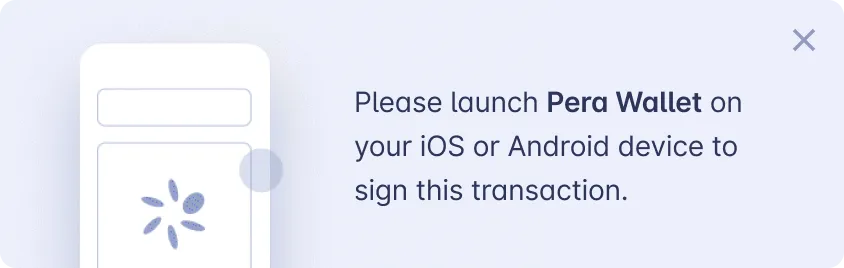 It’s enabled by default but in some cases, you may not need the toast message (e.g. you already have signing guidance for users). To disable it, use the shouldShowSignTxnToast option:
```jsx
const peraWallet = new PeraWalletConnect({
shouldShowSignTxnToast: false
});
```
**3. Create connect example button for wallet connection:**
```jsx
function App() {
// Store account address which is connected dApp with Pera Wallet
const [accountAddress, setAccountAddress] = (useState < string) | (null > null);
// Check app is connected with Pera Wallet
const isConnectedToPeraWallet = !!accountAddress;
return (
);
}
```
**4. Create handler methods for Pera Wallet connection:** **`handleWalletConnectClick()`**
```typescript
function handleConnectWalletClick() {
peraWallet
.connect()
.then((newAccounts) => {
// Setup the disconnect event listener
peraWallet.connector?.on("disconnect", handleDisconnectWalletClick);
setAccountAddress(newAccounts[0]);
})
.reject((error) => {
// You MUST handle the reject because once the user closes the modal, peraWallet.connect() promise will be rejected.
// For the async/await syntax you MUST use try/catch
if (error?.data?.type !== "CONNECT_MODAL_CLOSED") {
// log the necessary errors
}
});
}
```
**`handleDisconnectWalletClick()`**
```typescript
function handleDisconnectWalletClick() {
peraWallet.disconnect();
setAccountAddress(null);
}
```
We use them in the onClick event of the button that we created in the previous step. If there is an account connected to the dApp, we use the `handleDisconnectWalletClick()` function, if there is no account connected, we use the `handleWalletConnectClick()` function. **5. If you don’t want the user’s account information to be lost by the dApp when the user closes the browser with with the wallet connection to the dApp, you need to handle the reconnect session status. You can do this in the following way:**
```jsx
useEffect(() => {
// Reconnect to the session when the component is mounted
peraWallet.reconnectSession().then((accounts) => {
// Setup the disconnect event listener
peraWallet.connector?.on("disconnect", handleDisconnectWalletClick);
if (peraWallet.isConnected && accounts.length) {
setAccountAddress(accounts[0]);
}
}).catch(error) {
console.log(error);
};
}, []);
```
After these 5 steps, you can use your dApp making new transactions with Pera Wallet 🎊. Your `App.tsx` file will look like this.
```jsx
import {PeraWalletConnect} from "@perawallet/connect";
// Create the PeraWalletConnect instance outside of the component
const peraWallet = new PeraWalletConnect();
function App() {
const [accountAddress, setAccountAddress] = (useState < string) | (null > null);
const isConnectedToPeraWallet = !!accountAddress;
useEffect(() => {
// Reconnect to the session when the component is mounted
peraWallet.reconnectSession().then((accounts) => {
// Setup the disconnect event listener
peraWallet.connector?.on("disconnect", handleDisconnectWalletClick);
if (accounts.length) {
setAccountAddress(accounts[0]);
}
});
}, []);
return (
);
function handleConnectWalletClick() {
peraWallet
.connect()
.then((newAccounts) => {
// Setup the disconnect event listener
peraWallet.connector?.on("disconnect", handleDisconnectWalletClick);
setAccountAddress(newAccounts[0]);
})
.reject((error) => {
// You MUST handle the reject because once the user closes the modal, peraWallet.connect() promise will be rejected.
// For the async/await syntax you MUST use try/catch
if (error?.data?.type !== "CONNECT_MODAL_CLOSED") {
// log the necessary errors
}
});
}
function handleDisconnectWalletClick() {
peraWallet.disconnect();
setAccountAddress(null);
}
}
```
#### Using with `React@18` [Section titled “Using with React@18”](#using-with-react18) When you want to use `@perawallet/connect` library with `React 18`, you need to make some changes. `react-scripts` stopped polyfilling some of the packages with the `react-scripts@5.x` version. After creating a new app with `npx create-react-app my-app` or in your react application, the following changes should be made. 1. Firstly, install the following packages
```bash
npm install buffer
npm install crypto-browserify
npm install process
npm install react-app-rewired
npm install stream-browserify
```
2\. After that you need to override some **`webpack`** features. Create the following file in the root directory of the project and copy the following code block into it. `config-overrides.js`
```jsx
// eslint-disable-next-line @typescript-eslint/no-var-requires
const webpack = require('webpack');
module.exports = function override(config) {
const fallback = config.resolve.fallback || {};
Object.assign(fallback, {
crypto: require.resolve('crypto-browserify'),
stream: require.resolve('stream-browserify'),
});
config.resolve.fallback = fallback;
// ignore warning about source map of perawallet/connect
config.ignoreWarnings = [/Failed to parse source map/];
config.plugins = (config.plugins || []).concat([
new webpack.ProvidePlugin({
process: 'process/browser',
Buffer: ['buffer', 'Buffer'],
}),
]);
return config;
};
```
3\. You need to update `react-scripts` version to `5.0.1` or higher.
```json
{
"react-scripts": "5.0.1",
}
```
4\. Finally, you need to update the `npm scripts`.
```json
{
"start": "react-app-rewired start",
"build": "react-app-rewired build"
}
```
After that, you are good to go! 🎊 ### Methods [Section titled “Methods”](#methods)
```tsx
PeraWalletConnect.connect(): Promise
```
* Starts the initial connection flow and returns the array of account addresses.
```tsx
PeraWalletConnect.reconnectSession(): Promise
```
* Reconnects to the wallet if there is any active connection and returns the array of account addresses.
```tsx
PeraWalletConnect.disconnect(): Promise
```
* Disconnects from the wallet and resets the related storage items.
```tsx
PeraWalletConnect.platform: PeraWalletPlatformType
```
* Returns the platform of the active session. Possible responses: *`mobile | web | null`*
```tsx
PeraWalletConnect.isConnected: boolean
```
* Checks if there’s any active session regardless of platform. Possible responses: *`true | false`*
```tsx
PeraWalletConnect.signTransaction(txGroups: SignerTransaction[][], signerAddress?: string): Promise
```
* Starts the sign process and returns the signed transaction in `Uint8Array` ### Signing Transactions [Section titled “Signing Transactions”](#signing-transactions) `@perawallet/connect` also allows signing transactions using the Pera Wallet application. Once the `signTransaction` method is triggered, if the user is on a mobile browser, the Pera Wallet app will be launched automatically. If the browser blocks the redirection there’s also a popup that links to the Pera Wallet app. There’s an option called `shouldShowSignTxnToast` to disable it, see the example below:
```jsx
const peraWallet = new PeraWalletConnect({shouldShowSignTxnToast: false});
```
You can also call the `closePeraWalletSignTxnToast` function to hide the toast.
```jsx
import {closePeraWalletSignTxnToast} from "@perawallet/connect";
// ...Business logic
// Close the toast message
closePeraWalletSignTxnToast();
```
`signTransaction` accepts `SignerTransaction[][]` the type can be find below:
```jsx
import {Transaction} from "algosdk";
export interface SignerTransaction {
txn: Transaction;
/**
* Optional list of addresses that must sign the transactions.
* Wallet skips to sign this txn if signers is empty array.
* If undefined, wallet tries to sign it.
*/
signers?: string[];
}
```
You have to follow these steps to a sign transaction. 1. Set up `algosdk` client
```jsx
const algod = new algosdk.Algodv2("", CLIENT_SERVER_URL, CLIENT_SERVER_PORT);
```
2\. Set up `Transactions`
```jsx
const suggestedParams = await algod.getTransactionParams().do();
const optInTxn = algosdk.makeAssetTransferTxnWithSuggestedParamsFromObject({
from: FROM_ADDRESS,
to: FROM_ADDRESS,
assetIndex: ASSET_ID,
amount: 0,
suggestedParams
});
const optInTxn2 = algosdk.makeAssetTransferTxnWithSuggestedParamsFromObject({
from: FROM_ADDRESS,
to: FROM_ADDRESS,
assetIndex: ASSET_ID,
amount: 0,
suggestedParams
});
```
3\. Map `Transaction` to `SignerTransaction[]`
```jsx
const singleTxnGroups = [{txn: optInTxn, signers: [FROM_ADDRESS]}];
const multipleTxnGroups = [
{txn: optInTxn, signers: [FROM_ADDRESS]},
{txn: optInTxn2, signers: [FROM_ADDRESS]}
];
```
4\. (Optional step) Create some utility functions to create the transaction before the sign transaction function **`generateOptIntoAssetTxns({assetID, initiatorAddr})`**
```typescript
async function generateOptIntoAssetTxns({
assetID,
initiatorAddr
}: {
assetID: number;
initiatorAddr: string;
}): Promise {
const suggestedParams = await algod.getTransactionParams().do();
const optInTxn = algosdk.makeAssetTransferTxnWithSuggestedParamsFromObject({
from: initiatorAddr,
to: initiatorAddr,
assetIndex: assetID,
amount: 0,
suggestedParams
});
return [{txn: optInTxn, signers: [initiatorAddr]}];
}
generatePaymentTxns({to, initiatorAddr})
async function generatePaymentTxns({
to,
initiatorAddr
}: {
to: string;
initiatorAddr: string;
}) {
const suggestedParams = await algod.getTransactionParams().do();
const txn = algosdk.makePaymentTxnWithSuggestedParamsFromObject({
from: initiatorAddr,
to,
amount: 1,
suggestedParams
});
return [{txn, signers: [initiatorAddr]}];
}
```
**`generateAssetTransferTxns({to, assetID, initiatorAddr})`**
```jsx
async function generateAssetTransferTxns({
to,
assetID,
initiatorAddr
}: {
to: string;
assetID: number;
initiatorAddr: string;
}) {
const suggestedParams = await algod.getTransactionParams().do();
const txn = algosdk.makeAssetTransferTxnWithSuggestedParamsFromObject({
from: initiatorAddr,
to,
assetIndex: assetID,
amount: 1,
suggestedParams
});
return [{txn, signers: [initiatorAddr]}];
}
```
5\. After this, you can sign a single transaction or group transaction using promises **Single Transaction**
```jsx
try {
const signedTxn = await peraWallet.signTransaction([singleTxnGroups]);
} catch (error) {
console.log("Couldn't sign Opt-in txns", error);
}
```
**Group Transaction**
```jsx
try {
const signedTxns = await peraWallet.signTransaction([multipleTxnGroups]);
} catch (error) {
console.log("Couldn't sign Opt-in txns", error);
}
```
**Payment Transactions**
```jsx
const txGroups = await generatePaymentTxns({
to: "GD64YIY3TWGDMCNPP553DZPPR6LDUSFQOIJVFDPPXWEG3FVOJCCDBBHU5A",
initiatorAddr: accountAddress!
});
try {
const signedTxnGroup = await peraWallet.signTransaction([txGroups]);
const {txId} = await algod.sendRawTransaction(signedTxnGroup).do();
} catch (error) {
console.log("Couldn't sign payment txns",error);
}
```
**Asset Transfer Transactions**
```jsx
const txGroups = await generateAssetTransferTxns({
to: "GD64YIY3TWGDMCNPP553DZPPR6LDUSFQOIJVFDPPXWEG3FVOJCCDBBHU5A",
assetID: 10458941,
initiatorAddr: accountAddress!
});
try {
const signedTxnGroup = await peraWallet.signTransaction([txGroups]);
console.log(signedTxnGroup);
const {txId} = await algod.sendRawTransaction(signedTxnGroup).do();
} catch (error) {
console.log("Couldn't sign asset transfer txns",error);
}
```
**Opt-In Asset Transactions**
```jsx
const txGroups = await generateOptIntoAssetTxns({
assetID: 10458941,
initiatorAddr: accountAddress!
});
try {
await peraWallet.signTransaction([txGroups]);
} catch (error) {
console.log("Couldn't sign Opt-in txns",error);
}
```
**Multiple Transactions**
```jsx
const optinTxGroups = await generateOptIntoAssetTxns({
assetID: 10458941,
initiatorAddr: accountAddress!
});
const transferTxGroups = await generateAssetTransferTxns({
to: "GD64YIY3TWGDMCNPP553DZPPR6LDUSFQOIJVFDPPXWEG3FVOJCCDBBHU5A",
assetID: 10458941,
initiatorAddr: accountAddress!
});
try {
const signedTxnGroups = await peraWallet.signTransaction([
optinTxGroups,
transferTxGroups
]);
console.log(signedTxnGroups);
// Sign every txn in the group
for (const signedTxnGroup of signedTxnGroups) {
const {txId} = await algod.sendRawTransaction(signedTxnGroup).do();
console.log(`txns signed successfully! - txID: ${txId}`);
}
} catch (error) {
console.log("Couldn't sign all txns",error);
}
```
### Customization [Section titled “Customization”](#customization) `@perawallet/connect` lets you UI change a few things based on your dApp’s needs. 1. Change **Pera Wallet Connect Modal** `z-index` to avoid conflicts
```scss
.pera-wallet-modal {
// The default value of z-index is 10. You can lower and raise it as much as you want.
z-index: 11;
}
```
2\. Remove **Sign Guidance Toast**
```jsx
const peraWallet = new PeraWalletConnect({
shouldShowSignTxnToast: false
});
```
3\. Close **Sign Guidance Toast**
```jsx
import {closePeraWalletSignTxnToast} from "@perawallet/connect";
// ...Business logic
// Close the toast message
closePeraWalletSignTxnToast();
```
4\. Your app name on `Pera Wallet` By default, the connect wallet drawer on **Pera Wallet** gets the app name from `document.title` In some cases, you may want to customize it. You can achieve this by adding a meta tag to your HTML between the `head` tag.
```html
```
### Example Applications [Section titled “Example Applications”](#example-applications) * [Using React Hooks](https://codesandbox.io/s/perawallet-connect-react-demo-zlvokc) * [Using React Hooks with React@18](https://codesandbox.io/s/perawallet-connect-react-18-demo-tig2md) * [Using Vue3](https://codesandbox.io/s/perawallet-connect-vue3-demo-yiyw4b) * [Using Svelte](https://codesandbox.io/s/perawallet-connect-svelte-demo-ys1m4x) * [Using Next.js](https://codesandbox.io/s/perawallet-connect-next-js-demo-ryhbdb) * [Using Nuxt.js](https://codesandbox.io/s/perawallet-connect-nuxt-js-demo-s65z58) * [Vanilla JS](https://codesandbox.io/s/perawallet-connect-vanillajs-demo-s5pjeo) ### **Brand Guidelines** [Section titled “Brand Guidelines”](#brand-guidelines) Please follow our brand guidelines when using `@perawallet/connect` in your dApp. To download our Media Kit that includes useful assets such as the official Pera logo, App images, roadmap, and official links, please visit our [website](https://perawallet.app/media-kit/).
# Public API
> Public API endpoints for fetching ASA data from Pera.
Here, you’ll find everything you need to know about accessing and interacting with our Public API endpoints. Our API allows you to seamlessly integrate our services into your applications. Below is an overview of the key endpoints available to you, along with detailed descriptions and usage instructions. #### Base URL [Section titled “Base URL”](#base-url) Base URL for all endpoints listed on this page `https://mainnet.api.perawallet.app/v1/` #### Swagger [Section titled “Swagger”](#swagger) [Pera Wallet Public API Swagger](https://api.perawallet.app/v1/documentation/)Interactive Swagger UI for the Public API You can also [download the OpenAPI specification](/assets/public_api_swagger.yaml) for this API. ## Verified Asset List [Section titled “Verified Asset List”](#verified-asset-list)
```plaintext
GET /public/verified-assets/
```
This is a simplified endpoint that returns all verified assets in a single response. The endpoint returns verified assets with asset verification label by excluding suspicious and unverified ones. If your business logic needs to know the verified asset ids, this is the endpoint you should use. It is lightweight and doesn’t require pagination. * Response is cached for 5 min. **Query parameters** | Name | Type | Required | Description | | ---------- | ------ | -------- | --------------------------------------------- | | `ordering` | string | No | Which field to use when ordering the results. | **Example request**
```bash
curl "https://mainnet.api.perawallet.app/v1/public/verified-assets/"
```
**Example response**
```json
{
"next": null,
"previous": null,
"results": [
{
"asset_id": 312769,
"verification_tier": "verified"
},
{
"asset_id": 31566704,
"verification_tier": "verified"
}
]
}
```
## Labeled Asset List [Section titled “Labeled Asset List”](#labeled-asset-list)
```plaintext
GET /public/labeled-assets/
```
This is a simplified endpoint that returns all labeled assets in a single response. The endpoint returns verified and suspicious assets with asset verification label by excluding unverified ones. If your business logic needs to know the labeled asset ids, this is the endpoint you should use. It is lightweight and doesn’t require pagination. * Response is cached for 5 min. **Query parameters** | Name | Type | Required | Description | | ---------- | ------ | -------- | --------------------------------------------- | | `ordering` | string | No | Which field to use when ordering the results. | **Example request**
```bash
curl "https://mainnet.api.perawallet.app/v1/public/labeled-assets/"
```
**Example response**
```json
{
"next": null,
"previous": null,
"results": [
{
"asset_id": 312769,
"verification_tier": "verified"
},
{
"asset_id": 31566704,
"verification_tier": "verified"
}
]
}
```
## Asset List [Section titled “Asset List”](#asset-list)
```plaintext
GET /public/assets/
```
This public endpoint returns all assets. * Response is cached for 5 min. * Maximum page size: 1000 * Default page size: 50 * Page size options: 50, 100, 500, 1000 **Query parameters** | Name | Type | Required | Description | | ---------- | ------- | -------- | --------------------------------------------- | | `filter` | string | No | `['is_verified', 'is_collectible']` | | `ordering` | string | No | Which field to use when ordering the results. | | `cursor` | string | No | The pagination cursor value. | | `limit` | integer | No | Number of results to return per page. | **Example request**
```bash
curl "https://mainnet.api.perawallet.app/v1/public/assets/?limit=50"
```
**Example response**
```json
{
"next": "https://mainnet.api.perawallet.app/v1/public/assets/?cursor=cD0zNjYzNzcxMzQ0&limit=50",
"previous": null,
"results": [
{
"asset_id": 3663775747,
"name": "Alpha Market 3663775657 No",
"unit_name": "ALPHA-N",
"fraction_decimals": 6,
"total_supply": 18446744073709551615,
"total_supply_as_str": "18446744073709551615",
"is_deleted": false,
"creator_address": "EXE3LHF4TZTV3LY32ZQBZV736XD4MDLW2INCEGZRTRMOUIECQSZMWR6WXY",
"url": "https://www.alphaarcade.com/market/3663775657",
"logo": null,
"verification_tier": "unverified",
"usd_value": null,
"usd_value_24_hour_ago": null,
"is_collectible": false
}
]
}
```
## Asset Verification Detail [Section titled “Asset Verification Detail”](#asset-verification-detail)
```plaintext
GET /public/asset-verifications/{asset_id}/
```
This public endpoint returns `Asset` verification information about a specific `ASA` on the Algorand blockchain. This is the recommended public API for fetching the verification status of an `ASA` from Pera. More details about the verification program can be found here: **Path parameters** | Name | Type | Required | Description | | ---------- | ------- | -------- | ------------------ | | `asset_id` | integer | Yes | The ID of the ASA. | **Example request**
```bash
curl "https://mainnet.api.perawallet.app/v1/public/asset-verifications/31566704/"
```
**Example response**
```json
{
"asset_id": 31566704,
"verification_tier": "verified",
"explorer_url": "https://explorer.perawallet.app/assets/31566704/"
}
```
`verification_tier` is one of `trusted`, `verified`, `unverified` or `suspicious`. ## Asset Detail [Section titled “Asset Detail”](#asset-detail)
```plaintext
GET /public/assets/{asset_id}/
```
This public endpoint returns details of an asset. * Response is cached for 5 min. **Path parameters** | Name | Type | Required | Description | | ---------- | ------- | -------- | ------------------ | | `asset_id` | integer | Yes | The ID of the ASA. | **Query parameters** | Name | Type | Required | Description | | --------------------- | ------- | -------- | ---------------------------------------------------------------------- | | `include_collectible` | boolean | No | Include collectible (NFT) details in the response. Defaults to `true`. | **Example request**
```bash
curl "https://mainnet.api.perawallet.app/v1/public/assets/31566704/"
```
**Example response**
```json
{
"asset_id": 31566704,
"name": "USDC",
"unit_name": "USDC",
"fraction_decimals": 6,
"total_supply": 18446744073709551615,
"total_supply_as_str": "18446744073709551615",
"is_deleted": false,
"creator_address": "2UEQTE5QDNXPI7M3TU44G6SYKLFWLPQO7EBZM7K7MHMQQMFI4QJPLHQFHM",
"url": "https://www.centre.io/usdc",
"logo": "https://algorand-wallet-mainnet.b-cdn.net/media/usd-coin-usdc-logo.png",
"verification_tier": "verified",
"usd_value": "1.000000000000",
"usd_value_24_hour_ago": "1.000000000000",
"is_collectible": false,
"verification_details": null,
"collectible": null,
"description": "",
"circulating_supply": "200073111059522"
}
```
### Usage Requirements [Section titled “Usage Requirements”](#usage-requirements) To use Pera Wallet Public API you must comply with the following requirements: * Please note “Data provided by Pera” & display the Pera logo * Display the Pera Verified and Suspicious badges next to each ASA * Link to the ASA’s Pera Explorer page, with the Pera logo and “View on Pera Explorer” call to action clearly visible. All brand assets are [available at our media kit](https://perawallet.app/media-kit/). ### Deprecation Notice [Section titled “Deprecation Notice”](#deprecation-notice) As part of this expansion, we are restructuring our existing public endpoints. The current `v1/` endpoints will be moved to the `v1/public/` path. There will not be any change in the response format of these APIs, but the requests will be redirected to the new path starting August 1st 2024. It is important for users to migrate their projects to the new path to ensure faster access to the API.